
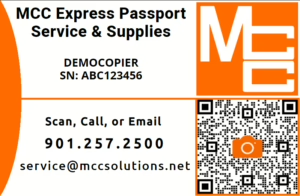
The MCC Express Passport is a quick way to request service, order supplies, report copier meter readings, or contact MCC directly from your smartphone. Each Passport is tied to a specific piece of equipment, so important details like your model and serial number are already connected to the request.
Instead of searching for equipment information or calling in with a serial number, simply scan the QR code on your MCC Express Passport label or card and choose the option you need.
Where to Find Your Express Passport
Your MCC Express Passport may be provided as:
- A label placed on the front of your copier or system
- A card kept near the equipment
- A QR code provided by MCC
The Passport includes the equipment model, serial number, MCC service contact information, and a QR code you can scan with your phone.
How to Open the Express Passport
- Open the camera app on your smartphone.
- Point your camera at the QR code on the MCC Express Passport.
- Tap the link that appears on your screen.
- Choose the option that matches what you need.
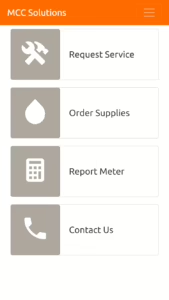
Once the Passport opens, you will see four main options:
- Request Service
- Order Supplies
- Report Meter
- Contact Us
Request Service
Use Request Service when your copier, printer, or covered system needs technical support.
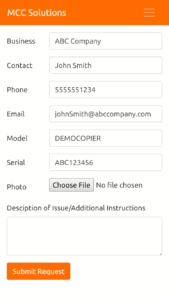
After you select Request Service, the form will automatically include the equipment information MCC needs, including the model and serial number. You do not need to search for the serial number or type it in manually.
To submit a service request:
- Tap Request Service.
- Review the pre-filled business, contact, model, and serial number information.
- Enter a description of the issue.
- Upload a photo if it helps show the problem.
- Tap Submit Request.
When describing the issue, include details such as error messages, print quality problems, paper jams, unusual noises, or when the issue started. The more detail you provide, the faster MCC can route and resolve the request.
Order Supplies
Use Order Supplies when you need toner, staples, waste toner bottles, or other supplies for your equipment.
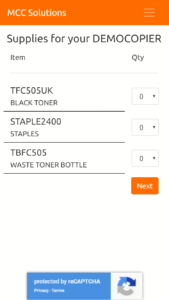
The Express Passport automatically displays the supplies that match your specific system, so you do not need to remember item numbers or supply codes.
To order supplies:
- Tap Order Supplies.
- Review the available supplies for your system.
- Select the quantity needed for each item.
- Tap Next.
- Submit the supply order.
Only order supplies for the equipment connected to that Passport. If you manage multiple machines, scan the Passport for the specific device that needs supplies.
Report Meter
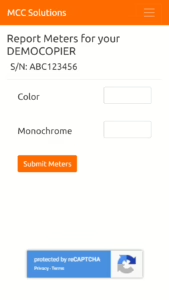
Use Report Meter to submit monthly copier meter readings.
Meter readings are used for accurate billing and service records, so it is important to enter the correct counts from the machine.
To report a meter:
- Tap Report Meter.
- Enter the current meter count or counts shown on the device.
- Review the numbers for accuracy.
- Tap Submit.
If you are not sure where to find the meter reading on your machine, contact MCC for help before submitting.
Contact Us
Use Contact Us if you prefer to reach MCC by phone or email, or if you need directions to an MCC office.
This option is helpful when you are not sure whether your issue should be submitted as a service request, supply order, meter report, or general question.
Tips for Faster Support
Before submitting a request, check that you are scanning the Passport for the correct machine. This is especially important if your office has multiple copiers or printers.
For service requests, include a clear description of the problem. A note like “machine not working” is less helpful than “paper jams from Tray 2 every time we print legal-size documents.” Tiny details save big headaches.
For supply orders, confirm the quantity before submitting. The available supply list is matched to your equipment, but the quantity is still selected by you.
For meter readings, double-check the numbers before you submit them. Incorrect meter readings can delay billing corrections later.
When to Contact MCC
Contact MCC if:
- The QR code does not open
- The information shown is incorrect
- Your machine is not listed correctly
- You are unsure which option to choose
- You need help finding your meter reading
- You submitted the wrong information by mistake
- You need a replacement Express Passport label or card
The MCC Express Passport is designed to make common service and supply tasks easier. Scan the code, choose what you need, and submit the request directly from your phone.